Monday, May 1, 2017

Creating Graphs Using PowerShell

I'm back!

Full disclosure...I have been doing a lot of fishing with my friends and spending time with family.  This was necessary because I was getting crabby for no reason.  I'm feeling much better thanks, again, to my friends and family members.

Now, on to graphing...

I subscribe to the PowerShell Power Users group on LinkedIn.  Looking at the latest articles, I found an article by Kevin Marquette called "Graph All Things! with PSGraph and GraphViz"  (https://www.linkedin.com/groups/140856/140856-6232213168123453443).  This is pretty cool.

NOTE: using PSGraph is not like graphing in Excel.  This are simple graphs that can be used for some complex solutions.  For example, here is a simple graph:
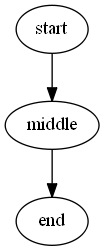
Basic Graph
graph basic {
    edge -From start -To middle
    edge -From middle -To end
}
Here is a sample of a complex graph:

}  | Export-PSGraph -ShowGraph
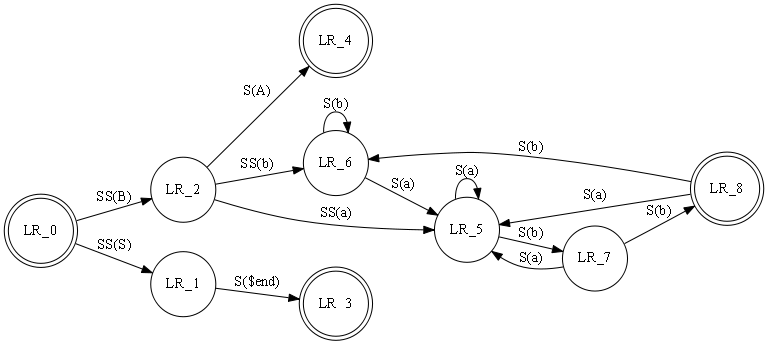
Source
graph finite_state_machine @{rankdir='LR';size=8.5} {
    node  LR_0,LR_3,LR_4,LR_8 @{shape='doublecircle'}
    node @{shape = 'circle'}
    edge LR_0 LR_2 @{ label = "SS(B)" }
    edge LR_0 LR_1 @{ label = "SS(S)" }
    edge LR_1 LR_3 @{ label = 'S($end)' }
    edge LR_2 LR_6 @{ label = "SS(b)" }
    edge LR_2 LR_5 @{ label = "SS(a)" }
    edge LR_2 LR_4 @{ label = "S(A)" }
    edge LR_5 LR_7 @{ label = "S(b)" }
    edge LR_5 LR_5 @{ label = "S(a)" }
    edge LR_6 LR_6 @{ label = "S(b)" }
    edge LR_6 LR_5 @{ label = "S(a)" }
    edge LR_7 LR_8 @{ label = "S(b)" }
    edge LR_7 LR_5 @{ label = "S(a)" }
    edge LR_8 LR_6 @{ label = "S(b)" }
    edge LR_8 LR_5 @{ label = "S(a)" }
}  | Export-PSGraph -ShowGraph

I can use PSGraph to give high level views of how some of our processes are working.  I can see using this for network diagrams and flow charting.

My next post will be on different scripting environments (ISE, ISESteroids, Powershell Plus, etc.)  Stay tuned.

Friday, April 28, 2017

Sorry for the delay...

I have been working on other projects that has used up my free time.  I do have an article coming up regarding the use of PSGraph.  It will be out next week.

Mike

Wednesday, March 29, 2017

Powershell Menu Script

While I was in my SAFe Practitioner class, an idea just popped into my head.  I should create a menu-type script that allows me to display all the administrative scripts I created.  This would give me quick access to my scripts without have to continually find the script, load the script, and run the script.

So...new project.  A convenient, and cool looking, menu of scripts.  I will start on this tomorrow.  I still have email I have to get through.

Tuesday, March 28, 2017

Off This Week

I am in SAFe Agile 4.0 training this week.  I'll have something new next week.

Friday, March 24, 2017

SQL Instance/Database Enumeration Script Version 1.0

IT IS ALIVE...

Through weeks of hard work I have created the following scripts that will get a list of SQL servers\instances, and will list out the databases for each server\instance.  Please forgive the code formatting.  The cut and paste to the blog page is wonky.

Get-instancesCMDLET.ps1
import-module activedirectory

$names = get-adcomputer -Filter * -Properties * -SearchBase '<LDAP base>' -ResultPageSize 1000 | where-object {$_.Name -NOTLIKE '*clus*'}

foreach($Name in $names) {

$result = Test-Connection -ComputerName $Name.name -Quiet # checks if the server is online

if ($result) {
 $objReg = [Microsoft.Win32.RegistryKey]::OpenRemoteBaseKey('LocalMachine', $Name.name)

$objRegKey= $objReg.OpenSubKey("SOFTWARE\\MICROSOFT\\MICROSOFT SQL SERVER" )

if ($objRegKey -ne $null) {

$instances = $objRegKey.GetValue("InstalledInstances", $null)


if ($instances.Count -gt 0) {

foreach($i in $instances) {

if ($i -match 'MSSQLSERVER') {

$output = $Name.name

} Else {

$output = $Name.name + '\' + $i


} $output | out-file -Append server_instance.csv

} #end of $instances foreach


} # end of if $instances.count

} # end of if $objRegKey

} # end of if $results

} # end of $names foreach 


The -Searchbase should be the OU in which you search for the servers, i.e., OU=Server,DC=abc,DC=com
Make sure the server_instances.csv file is deleted before you run the script so you don't have a file of redundant data.

Get-SQLServerInstanceDatabase.ps1 
function Get-DBList ($server)


{
 
$srv = New-Object 'Microsoft.SqlServer.Management.Smo.Server' $server # creates SMO object for server

$srv.Databases | Select name # returns database name(s)

 } #end Get-DBList function


$dbservers = import-csv server_instance.csv # this loads the SQL servers and instances created in the Get-InstancesCMDLET.ps1 script

$dbexclude = 'tempdb','model','msdb','master','dbmaint' # these are tables that every SQL server creates

foreach ($dbserver in $dbservers) {

$dbs = Get-DBList $dbserver.DBInstance # puts server name and instance in the variable

foreach ($db in $dbs) {

if ($db.name -notin $dbexclude) {

$hold = $dbserver.dbinstance + ',' + $db.Name

$hold | out-file -Append fullinstanceDB.txt

} # end if

} # end of $dbs foreach

} # end of $dbservers foreach


Again, make sure the server_instances.csv file is deleted before you run the script so you don't have a file of redundant data.

Bypassing Password Complexity Update...Case Closed

Upon further investigation, and trying many code snippets, I have concluded there is no way ( that I know of) to get around password complexity using PowerShell. 

This is good news!  If there was a way for a script geek like me to get around the group policy then Windows Server and Active Directory would be in serious trouble.


Wednesday, March 22, 2017

SQL Database Enumeration Script Update Part I

So, this SQL Instance Database enumeration script has been taking up all my free time.  This process is like running down a hallway with low hanging pipes.  I think I have the issues resolved and, PING, I hit one of the pipes.  Here is what I have to pull severs and instances:

foreach($Name in $names) {

$result = Test-Connection -ComputerName $Name.name -Quiet

if ($result) {

$objReg = [Microsoft.Win32.RegistryKey]::OpenRemoteBaseKey('LocalMachine', $Name.name)

$objRegKey= $objReg.OpenSubKey("SOFTWARE\\MICROSOFT\\MICROSOFT SQL SERVER" )

if ($objRegKey.GetValue("InstalledInstances")) {

$instances = $objRegKey.GetValue("InstalledInstances")

if ($instances.Count -gt 0) {

foreach($i in $instances) {

if ($i -match 'MSSQLSERVER') {

$output = $Name.name

} Else {

$output = $Name.name + '\' + $i


}
} #$output | out-file -Append server_instance.csv

#$output | out-file -append server_instance.csv

} else { $output = $Name.name } $output | out-file -Append server_instance.csv


}

}

}

This line $result = Test-Connection -ComputerName $Name.name -Quiet checks if the server is online.  This verification shortens the number of servers in the output file.  If $result is true, the next level is initiated.

This line  $objReg = [Microsoft.Win32.RegistryKey]::OpenRemoteBaseKey('LocalMachine', $Name.name)     adds registry information for the remote server to the $objReg variable.

This line  $objRegKey= $objReg.OpenSubKey("SOFTWARE\\MICROSOFT\\MICROSOFT SQL SERVER" )   adds the registry key for SOFTWARE\MICROSOFT\MICROSOFT SQL SERVER in the $objRegKey variable

This line if ($objRegKey.GetValue("InstalledInstances")) checks if the INSTALLEDINSTANCES key is present.  If it is present then the  $instances = $objRegKey.GetValue("InstalledInstances")  code loads the instances into the $instances variable.   

The next line if ($instances.Count -gt 0) checks if there are instances for the server.  I found that there will be no instances listed if the server is using the default MSSQLSERVER instance.  In this case the database script (which I will post later) will only need the server name and not server name\instance (i.e., sqlprd\mssqlserver). 

If there are instances in $instances, then the instance is checked for MSSQLSERVER.  If true, then only the server name is put in the $output variable.  Else, the server name and instance are put in the $output variable in the servername\instance format.

At the end the contents of the $output variable is written to the csv file.

This script works...for the most part.  I have found that one of my SQL server doesn't have all the instances listed.  I'm trying to figure this out today.

So, feel free to use this script.  NOTE: it is not perfect but is significantly better than what I had a week ago.